
Web orders into QuickBooks Desktop and Sage 50 U.S.
Your desktop accounting isn’t going anywhere, and neither are we.
CartSpan® posts your Shopify, WooCommerce and other web orders into QuickBooks Desktop or Sage 50 U.S. on its own, and checks your books for stock changes every minute and starts sending any it finds to your store. When an order’s lines don’t add up to what the customer paid, it holds that order and tells you.
We welcome calls about your store and your books. If CartSpan isn’t the right fit, we’ll tell you.
- $495, then $299 a year
- Any number of orders
- Stock updates included
Since 2007connecting stores to desktop books
A+BBB rating since 2017

“It is flat out the best technical support we have ever received.”
Justin Krauss, Managing Member, Garage Flooring LLC of Colorado
What happens to an order
Easy orders are easy for any connector. Here’s what CartSpan does with the hard ones.
One store. Every kind of customer.
On your store
Three orders arrive in the same hour, from three customer groups: Retail, Wholesale, and Dealers – West, a group you made up yourself.
In your books, each group gets its own paperwork
| Customer group | Posts as | Terms | Sales rep | Customer account |
|---|---|---|---|---|
| Retail | Paid invoice, or a QuickBooks sales receipt | Paid by card | House | One “Web Retail” account, so retail buyers don’t flood your customer list |
| Wholesale | Sales order | Net 30 | By the buyer’s billing state | Their own account, PO number on the order |
| Dealers – West | Sales order | Net 15 | The dealer rep | Their own account; QuickBooks Enterprise: their price level, not the web price |
- Payment method can decide too: anyone paying by check or PO gets a sales order.
- Any group your store uses works, and you can add more at any time. Set it up once in CartSpan, with no code.
The order that isn’t ready yet
On your store
Order #1047 is On hold, waiting for a check to clear. Order #1048 was Cancelled.
→
In your books
- Nothing yet. On-hold, failed and cancelled orders stay out
- #1047 posts once it’s Processing or Completed. You pick the statuses
- Shopify: post when paid, or when shipped and dated the ship date. Your choice
Sold one way, stocked another?
On your store
A 6-pack of shop towels, and a $80 garage starter kit: cleaner, squeegee and mop pads, sold as one item.
→
In your books
- The 6-pack posts as 6 single towels, the way you stock them
- The kit posts as its three items, the $80 split by their list prices: $48 / $20 / $12
- QuickBooks: already set up as a Group item? CartSpan recognizes it and splits it on import
- Your store shows 6-packs from your singles: on hand ÷ 6
Where are those transaction fees?
On your store
A customer pays $95.55 by PayPal. PayPal keeps $3.82 and sends you $91.73.
→
In your books
- The invoice, paid in full: $95.55
- $91.73 deposited to your PayPal account, so it matches PayPal’s statement
- The $3.82 fee booked to your fees account
- Same for card processors, with your formula for each
Examples. PayPal fee shown at 3.49% + $0.49; you enter your own formula. Kit components listed at $60 / $25 / $15. Status names are WooCommerce’s; other stores have their own.
One price
No tiers. No per-order fees. No meter running.
Subscription connectors charge by the month and by order volume. CartSpan is one price, whatever your volume, with stock updates and the fastest schedule included.
List prices checked October 13, 2026: MyWorks, Webgility, Sagify and Connex. Their prices rise with order volume; CartSpan’s doesn’t. Full named comparison on the pricing page. If you’re moving to QuickBooks Online, or sell a few orders a month on Shopify, a subscription connector may suit you better.
- Any number of orders. No per-order fees, overages or volume tiers.
- Stock updates included. Your books are checked for stock changes every minute.
- The fastest schedule isn’t an upgrade. Orders as often as every 15 minutes, for everyone.
- Setup included. We install and configure it with you, remotely, in about an hour.
- First 12 months of updates and support, then $299 a year.
- Hosted books cost the same. No surcharge for Summit Hosting or Ace Cloud Hosting.
QuickBooks Pro and Premier also need a read-only QODBC license, $149 per user a year (FLEXquarters, checked October 13, 2026); Enterprise includes it. Amazon comes at no extra charge.
What happens to your stock
Sending a number is easy. Sending the right number is the hard part.
One shelf. Every listing.
In your books · Shop towels, single
| On hand | 40 |
| Already on open orders | − 12 |
| Available to sell | 28 |
→
On your store, every listing from that one count
| Listing | Units in it | Shows |
|---|---|---|
| Shop towels, single | 1 | 28 |
| Shop towels, 6-pack | 6 | 4 |
| Shop towels, 12-pack | 12 | 2 |
- Packs round down, so you never sell a pack you can’t fill.
- Every listing that points at the item gets its own update: other SKUs and variants on your store, and marketplace listings where the marketplace accepts stock updates.
- QuickBooks Advanced Inventory: leave out stock held at sites such as “Returns”.
Sold at the counter?
In your books
At 2:14 you invoice 5 towels to a walk-in customer, right in QuickBooks or Sage 50.
→
On your store
- Shows 23 instead of 28 by about 2:15
- Same for receipts of new stock and inventory adjustments
- Only changed items are sent, so big catalogs stay quick
Built from parts?
In your books
A mop kit is an assembly in QuickBooks or Sage 50: 1 handle, 1 head, 2 pads. You have 9 handles, 14 heads and 30 pads.
→
On your store
- Shows 9 kits, the number you could build right now, plus any already built
- Recounted at every scheduled stock refresh
An order went wrong?
In your books
An order is held for a fix, so it isn’t in your books yet.
→
On your store
- Stock updates pause too, so your store never shows stock that’s already sold
- Fix the order, switch orders and stock back on, and your store catches up
Examples. Stock changes in your books are checked every minute; a full stock refresh also runs on the schedule you set, as often as every 15 minutes. Kits counted from their parts, and a few other stock options, update on that scheduled refresh only. How stock updates work →
01
It runs on its own, and stops when something needs you.
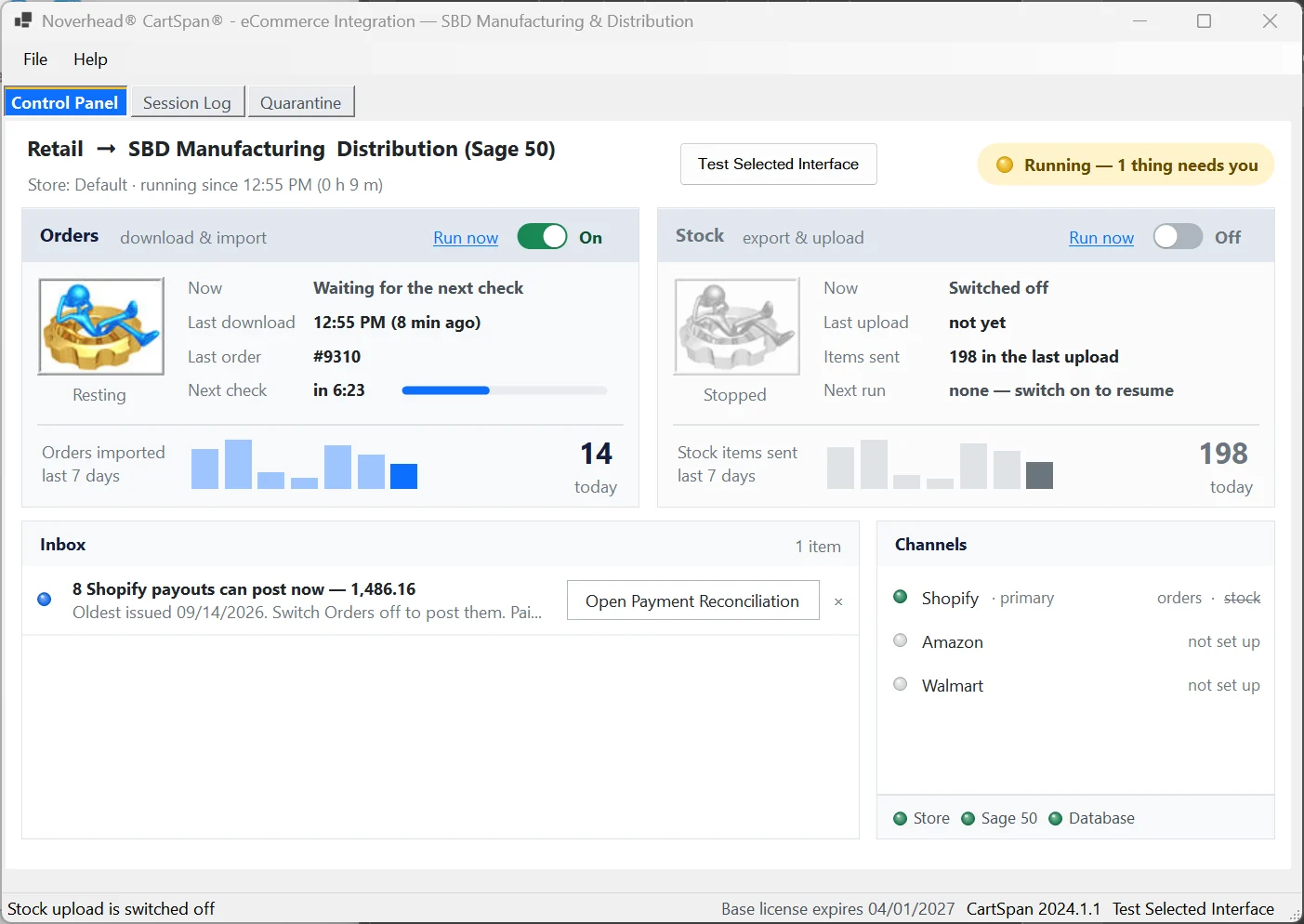
- Checks for new orders as often as every 15 minutes. Nobody clicks Import.
- Checks your books for stock changes every minute and starts sending any it finds to your store.
- Before each import it checks the order numbers already in your books (90 days back by default), so it won’t post the same order twice. If a batch reaches back further than that, say after months without an import, it stops and tells you how many days it needs.
- If an order doesn’t add up, CartSpan holds it, pauses stock updates so your store can’t show stock that’s already sold, and emails you. The Inbox shows which order and why.
- It also stops if an order names an item your books don’t have, or if the store’s order file can’t be read. Each stop is written to the Session Log and emailed to you, and order imports stay off until it’s fixed.

02
Your item list stays yours.
Sell a 6-pack or a case as its own store listing without adding an item to your books. And where store SKUs can’t match your item IDs, as on Amazon, map them once instead of renaming either.
- Point any number of store SKUs, variants or marketplace listings at one item in your books.
- Load the whole map from a spreadsheet, or straight from Shopify, BigCommerce and others; items no longer active in your books are flagged.
- An unknown item can be created for you, or posted to a catch-all item with the original SKU kept on the line.

03
Money lands where your bookkeeper expects it.
- Each payment method deposits to its own account, so every deposit in your books matches a line on a statement.
- Sage 50 and Shopify Payments: each payout posts as one deposit equal to the bank line, with Shopify’s actual fees and refunds.
- Every order must balance to the penny before it posts. If it doesn’t, CartSpan shows you the gap.
| Store payment method | Deposits to |
|---|---|
| Credit card | Merchant account |
| PayPal | PayPal |
| Shopify Payments (Sage 50) | One deposit per payout, equal to the bank line |
04
Tax that matches your store, to the penny.
- Keeps the tax your store charged and splits it across your tax agencies by rate.
- Picks the tax code by ZIP, city, county, state, country or store.
- Where Amazon already collected and paid the tax, CartSpan takes it off your liability and notes why.
- A taxed order with no matching code waits for you instead of posting to the wrong one.

Integrations
Pick your store and your books.
Your books
QuickBooks DesktopSage 50 U.S.
Works on your own PC or with hosts such as Summit Hosting and Ace Cloud Hosting.
Talk to the developer before you buy.
Call before you buy anything. We’ll talk through your store, your books and your orders, and tell you plainly whether CartSpan fits. If it does, we set it up with you, remotely, in about an hour.
8 am–5 pm Eastern, Monday to Friday, and sometimes later.
Questions
Straight answers.
The most common five. Every other question is on one searchable page.
Are there order limits or extra fees as I grow?
No. One price covers any number of orders, stock updates and the fastest schedule. The only extra: read-only QODBC for QuickBooks Pro and Premier. Amazon comes at no extra charge.
Do I need to install anything on my store?
We set up the connection with you during the trial. On WooCommerce there’s no WordPress plugin, so there’s nothing to update or clash with your other plugins.
Does it work with hosted Sage 50 or QuickBooks?
Yes, with third-party hosts such as Summit Hosting and Ace Cloud Hosting. Sage’s own Sage 50 Cloud hosting does not presently include support for any ecommerce integration add-on (Sage knowledge base, checked October 13, 2026).
What does QuickBooks Pro or Premier need?
A read-only QODBC license from FLEXquarters, $149 per user a year (checked October 13, 2026). QuickBooks Enterprise includes it.
What happens when an order can’t post?
CartSpan holds that order, pauses stock updates, emails you and shows the reason in its Inbox. Fix it, restore it and switch orders and stock back on, and CartSpan carries on from there.
Tell us about your store and your books.
A short call settles whether CartSpan fits. No pressure, no sales script.